Get your FIRST consultation for FREE
Build your own PC: DIY at our Experience Zone
+91 9217667394 | sales@digibuggy.com


DaVinci Resolve is one of the heaviest creator applications you can run in 2026.
Unlike lighter editing software, Resolve depends massively on:
especially once you start working with:
That is also why many “budget editing PCs” online are completely unrealistic for proper Resolve workloads.
A lot of older pricing guides still recommend hardware combinations that simply do not fit actual India pricing anymore once you include the following:
So let’s break down what a realistically good DaVinci Resolve PC actually costs in India in 2026.
In 2026, this is realistically the entry point for a proper Resolve setup.
At this budget, trying to force:
usually creates unrealistic builds or bad component compromises.
A properly balanced starter Resolve build at this range should focus primarily on:
Example: ₹1L-₹1.2L Resolve Build
|
Component |
Recommended Hardware |
|
CPU |
Ryzen 5 7600 |
|
GPU |
RTX 5060 8GB |
|
RAM |
16GB DDR5 |
|
Storage |
1TB NVMe SSD |
|
PSU |
650W Bronze |
|
Best For |
1080p editing, beginner 4K workflows |
A lot of people blindly force 32GB into lower budgets.
But for Resolve, GPU and VRAM matter more initially than maxing RAM while compromising elsewhere.
A balanced:
is smarter than stuffing unrealistic specs into the same price bracket.
You can also upgrade to 32GB later very easily on AM5.
This setup comfortably handles:
For beginner creators, this is currently the most realistic value entry point for Resolve in India.
👉 Want a Resolve-focused editing PC built around your workflow?
Configure Your Creator PC at Digibuggy
This is where Resolve starts becoming genuinely smooth.
At this budget, you can finally balance:
properly without major compromises.
Example: ₹1.4L-₹1.7L Resolve Build
|
Component |
Recommended Hardware |
|
CPU |
Ryzen 7 7700 |
|
GPU |
RTX 5070 12GB |
|
RAM |
32GB DDR5 |
|
Storage |
1TB Gen4 NVMe SSD |
|
PSU |
750W Gold |
|
Best For |
4K editing, grading, multitasking |
This is realistically where serious Resolve systems begin in India.
At this tier, you start getting:
without constantly worrying about bottlenecks.
This tier is ideal for:
This is also where 32GB DDR5 actually starts making proper financial and technical sense.
👉 Need a balanced editing and rendering workstation?
Build Your Digibuggy DaVinci Resolve PC
Once you cross ₹2.5 lakh, you enter serious workstation territory.
These systems are built for:
Example: ₹2.5L+ Resolve Workstation
|
Component |
Recommended Hardware |
|
CPU |
Ryzen 9 9900X |
|
GPU |
RTX 5080 16GB |
|
RAM |
64GB DDR5 |
|
Storage |
2TB Gen4 NVMe SSD |
|
PSU |
850W Gold |
|
Best For |
6K/8K workflows, AI, and professional rendering |
For professional users, absolutely.
Resolve scales heavily with:
especially once:
start entering the workflow.
For serious creators, higher-end GPUs save enormous amounts of time every week.
👉 Want a professional Resolve workstation configured properly?
Configure a High-End Digibuggy Editing PC
A lot of buyers overspend on CPU while ignoring GPU and VRAM.
For Resolve, overall balance matters much more.
Prioritise:
before chasing ultra-high-end CPUs.
Resolve is far more GPU-dependent than many people realise.
For most Resolve users, NVIDIA still tends to offer:
especially for:
That is why most professional Resolve systems still heavily favour RTX GPUs.
In 2026:
Fusion and larger timelines consume RAM surprisingly quickly once projects become more complex.
If you want a properly balanced Resolve workstation instead of randomly pairing incompatible parts, you can configure systems here:
Digibuggy AI PC Builder
You can also explore creator-focused systems here:
Digibuggy Content Creation PCs
In 2026:
The biggest mistake buyers make is focusing only on CPU while ignoring GPU power and VRAM.
For DaVinci Resolve, the GPU is often the single most important part of the system.
1. Is DaVinci Resolve more GPU-dependent than Premiere Pro?
Yes. Resolve relies far more heavily on GPU acceleration for playback, grading and effects.
2. How much VRAM do I need for DaVinci Resolve in 2026?
For comfortable 4K workflows, 12GB VRAM is strongly recommended.
3. Is the RTX 5060 enough for DaVinci Resolve?
Yes. The RTX 5060 works well for 1080p editing and lighter 4K workflows.
4. Is 16GB RAM enough for Resolve?
For beginner workflows, yes. But 32GB becomes important once projects become heavier.
5. Is the RTX 5070 good for Resolve?
Yes. The RTX 5070 is currently one of the best-balanced GPUs for serious 4K Resolve workflows.
6. Does storage speed matter in Resolve?
Absolutely. Fast NVMe SSDs significantly improve caching, playback and media handling.
7. Is NVIDIA better than AMD for Resolve?
For most users, NVIDIA still offers better CUDA optimization and creator ecosystem support in Resolve workflows.
CPU N/A
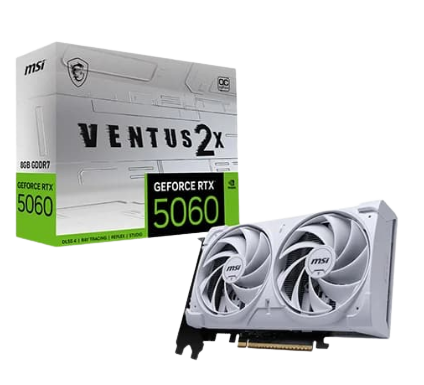
GRAPHICS CARD MSI RTX 5060 Ventus 2X OC...
STORAGE N/A
RAM N/A