Upgrade Your Current Setup for ₹30,000 (Best Value for the Money in India)
Let's face it, purchasing a brand new computer every time the performance dips isn't a reasonable solution.
The good news is that you don't necessarily need to upgrade completely to see a significant difference in performance.
With a smart budget of ₹30,000, you can give your gaming/office/desktop PC a new lease on life with improved performance and no more lagging.
In this guide, we will highlight the best value for money upgrades for PCs in India (2026) that can provide noticeable improvements in PC performance.
Reasons Why You Should Upgrade Instead of Buying a New PC
An upgrade will be more cost-effective than building a new PC along with allowing you to keep using your older equipment:
Save up to 70% the cost of building a new computer
Increase the life expectancy of your computer 2 to 4 years
Only focus on improving the actual bottlenecks of your computer
Receive an increase in overall performance almost immediately through upgrading your computer components.
1. Upgrade to an NVMe SSD (Biggest Performance Boost)
This is your cue if you are still using an HDD or SATA SSD.
The importance:
- Time to boot becomes 60 seconds to 10 seconds
- Time to load games becomes significantly faster
- Time to open softwares becomes instantaneous
Look for:
- An NVMe SSD (minimum capacity of 500 GB - 1TB)
- A PCIe Gen 3 or Gen 4 (based on what your motherboard supports)
Cost:
Final decision:
- Unquestionably, this is the most significant possible upgrade.
https://digibuggy.com/product/Gigabyte-4000E-500GB-NVMe-Gen4-SSD
2. Add More RAM (Multitasking Beast Mode)
When you have an active Chrome browser, Discord connection, and a campaign/game running at the same time and your computer just cries… you probably need to upgrade your RAM!
Best configuration:
- Upgrade to 16 gb minimum
- If you are an editor/streamer, upgrade to 32 GB.
Benefits of upgrading to at least 16 GB:
- Easier multi-tasking (running multiple apps/programs will be much smoother)
- Better reliability for gaming
- Faster rendering in editing software
Cost:
Professional Tip: Always match the RAM speed, and use dual-channel RAM to achieve maximum performance.
https://digibuggy.com/product/Crucial-8GB-3200MHz-CL22-DDR4-RAM
3. Upgrade Your GPU (For Gamers & Creators)
If your primary goal is increased gaming performance, this is the place to find it.
Great options to upgrade if you have a budget of ₹30000 or less:
- Entry and mid-level graphics cards
Recommended use:
- Gaming at 1080p on high settings
What does upgrading provide?
- Increased frames per second, better video quality, and more seamless edit/render processes.
Budget for the GPU:
Remember: Choosing to upgrade your GPU will be the largest improvement in your graphics if your CPU isn’t holding you back.
https://digibuggy.com/product/MSI-RTX-5050-Shadow-2X-OC-8GB-GDDR6
4. Upgrade Your CPU (If You’re Bottlenecked)
Your CPU may be slowing down your graphics card even if it is functioning properly.
Indicators you need a new CPU:
- When playing games, your CPU maxes out at 90-100%.
- You are experiencing lag even on low settings
- Your rendering/export times are slow.
Advantages of upgrading:
- Improved FPS consistency
- More efficient productivity workflows
- Support for future use.
Cost of upgrade:
- ₹8000.00 - ₹20000.00 (depending on platform).
**Note**: It is important to verify that the CPU that you want to buy will work on your motherboard before buying it.
https://digibuggy.com/product/AMD-Ryzen-5-5500GT
5. Improve Cooling (Underrated but Game-Changing)
This is something that most people overlook but is very important.
Why is this important?
- To prevent thermal throttling
- To keep performance constant
- To increase the life of the components
Options
- Better air cooling
- Budget AIO Liquid Cooling
- Additional case fans
Budget
https://digibuggy.com/product/MSI-MAG-COREFROZR-AA13-ARGB-120mm-CPU-Air-Cooler
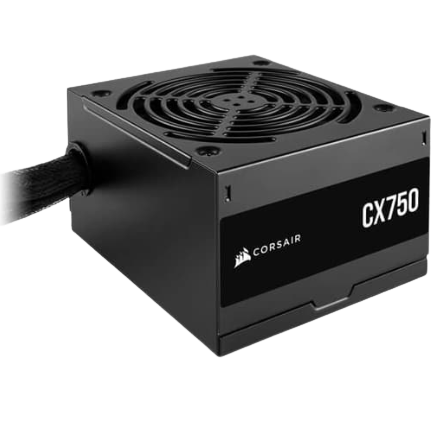
6. Upgrade Power Supply (For Stability & Safety)
PSU upgrade needed when upgrading GPU/CPU:
Why it's important:
- Powers components.
- Keeps system stable.
- Prevents crashes and shutdowns.
Things to consider:
- 80+ Bronze or higher efficiency ratings.
- Only from reputable brands.
Price range:
https://digibuggy.com/product/MSI-MAG-A550BN-550-Watt-80-Plus-Bronze-SMPS
How to Decide What to Upgrade?
Consider the following:
Is the computer slow in general? → Upgrade to an SSD
Is it lagging when multitasking? → Upgrade the RAM
Getting slow FPS on games? → Upgrade the GPU
Is there high CPU usage and stutters? → Upgrade the CPU processor
Guideline: Find the cause of the bottleneck and fix it. Not all your upgrades will be equal.
Final Thoughts
You don’t have to spend ₹1 lakh to upgrade your computer.
For as little as ₹30,000.00 or less, you can:
- Lower your load times
- Increase your FPS
- Increase your performance
- Feel as if you are using a brand-new computer
Make smart upgrades, not expensive upgrades.
Frequently Asked Questions (FAQs)
1. What is the best upgrade below ₹30,000?
An NVMe SSD with RAM upgrades is a huge efficiency increase overall.
2. Should I upgrade the GPU or CPU first?
Upgrade whichever component is bottlenecking your system.
3. Is 16GB RAM enough by 2026?
Yes, but if you do a lot of editing or multitasking with many windows/programs open, you should have 32GB RAM.
4. Can I upgrade my own computer?
Yes, many upgrades can be done by you (DIY); however, be sure to check for compatibility before attempting a DIY upgrade.