Artificial intelligence (AI) has become more accessible beyond large companies that conduct research using it.
There is a growing trend for individuals to use AI in their houses with ChatGPT, video upscaling, coding assistants, and local AI PCs.
Best of all, you don’t need Rs. 2-3 lakhs to get started.
You can build an impressive AI PC with Rs. 1 lakh.
The AI PC will handle the following:
• Local LLMs (i.e. similar to LLaMA, etc.)
• Stable Diffusion to create images
• Video editing + using AI tools
• Coding + using automation workflows.
Let us look into all these areas a bit more.
What Makes a PC "AI-Ready"?
Understand that AI workloads depend on three things before diving into any sections:
- GPU (King VRAM) - For running models
- RAM - For working with huge amounts of data and multitasking
- Fast Storage (SSD) - For quickly loading models
- While CPU is important, it is not the primary concern here.
Ideal AI PC Build Under ₹1 Lakh (2026)
Here’s a balanced, high-performance build:
💻 Processor
► AMD Ryzen 5 7600
- 6 cores / 12 threads.
- Awesome for multitasking and productivity.
- The platform is future proof (AM5).
- Price ~ ₹18,000.
https://digibuggy.com/product/AMD-Ryzen-5-7600
⚙️ Graphics Card
► NVIDIA RTX 5050
- New architecture for greater efficiency when compared to 40 Series
- Expected to offer 8GB VRAM (which is a minimum requirement for AI workloads)
- Tensor Performance update vs. RTX 4060
- Complete support for the CUDA and AI software stacks.
- Approximate Retail Price: ₹28,000 - ₹32,000
https://digibuggy.com/product/MSI-RTX-5050-Shadow-2X-OC-8GB-GDDR6
📍 Memory
► 32GB DDR5 (16x2).
- Guarantees decent performance with AI job workloads that will use all the RAM.
- Price ~ ₹9,000 - ₹12,000.
https://digibuggy.com/product/G.Skill-Ripjaws-S5-Matte-Black-16GB-6000MHz-CL36-DDR5
💽 Storage
1TB NVMe SSD (Gen 4)
- Will allow for faster loading of models
- Will result in a smoother experience when working with large projects.
- Price ~ ₹5,000 - ₹7,000.
https://digibuggy.com/product/Adata%20XPG%20Gammix-S70-Blade-1TB-M.2-NVMe-Gen4-Internal-SSD
🎛️ Motherboard
B650 (AM5)
- Supports all the latest Ryzen CPUs.
- Provides an excellent upgrade path.
- Price ~ ₹12,000 - ₹15,000.
https://digibuggy.com/product/MSI-B650M-Gaming-Plus-WIFI-M-Motherboard
🔌 Power Supply
650W 80+ Bronze
- Provides stable energy to the system.
- Room for future upgrades.
- Price ~ ₹4,000 - ₹6,000.
https://digibuggy.com/product/ANT-Esports-RX650-80-Plus-Bronze-Smps
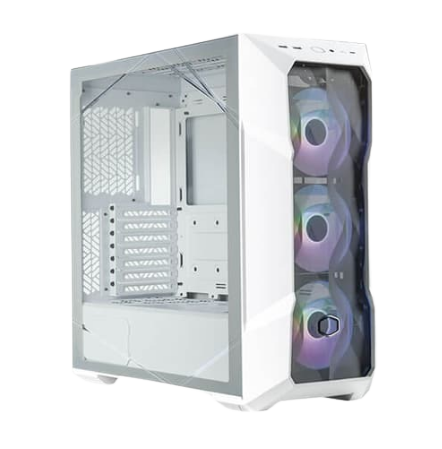
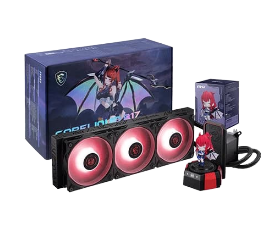
❄️ Case and Cooling
- Decent airflow through the case is sufficient.
- 2-3 case fans may be added.
- Price ~ ₹4,000 - ₹6,000
https://digibuggy.com/product/MSI-MAG-COREFROZR-AA13-White-ARGB-120mm-CPU-Air-Cooler
https://digibuggy.com/product/MSI-Mag-Forge-130A-Airflow-Auto-RGB-ATX-Mid-Tower
What Makes This Build Ideal For AI
This configuration has been optimized for practical applications, not just specifications in a brochure.
Here is what you can do with this build:
- Run Stable Diffusion on your machine
- Utilize AI code assistants
- Experiment with local Large Language Models between 7 billion - 13 billion parameters
- Edit videos using AI features
- Run automation workflow.
Where This Build Has Limits
Let’s be straightforward.
- Very large/complex AI models (30B+ parameters) not suited.
- 8GB VRAM capacity could be constricting for complex AI tasks.
- For complex enterprise-level AIs, this GPU is not the best option for your budgets.
90%+ of content creators, students, developers, etc. could use it with satisfaction.
AMD vs Intel for AI Builds?
Short answer:
AMD → Better value + future upgrades
Intel → Slight edge in some productivity tasks
For this budget, AMD wins.
Prebuilt vs Custom AI PC
Prebuilt:
- Convenient
- Faster delivery
Custom Build:
- Better performance per rupee
- Full control over parts
- Easy upgrades later
If you care about performance → go custom.
Final Thoughts
AI computers are not “future technologies” anymore; they are currently viable tools.
A computer built for under ₹1 lakh can:
- Run AI locally
- Improve your workflow
- Make you self-reliant from cloud-based limitations
And once you start using an AI on a local machine, there is no possibility of going back.
There are limitations to this system if you want to work with models that are much larger than 30 billion parameters. Additionally, the 8 GB of VRAM can be limiting for high-level AI tasks, but for most people (students, developers, creators), the build will work well for you.
Frequently Asked Questions (FAQs)
1. Is it possible to perform AI tasks well with the RTX 5050?
The RTX 5050 is adequate to support entry-level and mid-level artificial intelligence workloads.
2. Should I consider having 32 GB of RAM for AI use?
Having 32 GB of RAM is strongly suggested to provide optimal AI performance across the board.
3. Is it possible to operate ChatGPT on my local computer?
You can run small local LLMs; however, you will not have the capability of running full-scale ChatGPT-type models on your PC.
4. Should I upgrade my GPU or add additional RAM first?
If you have exhausted your VRAM, the first component to upgrade will be your GPU.